An order got stuck halfway through post processing. Somebody re-ran it. It went through fine. Ticket closed.
A few weeks later it happened again, and we did the same thing, because the same thing worked.
That is a great way to never fix anything.
The pipeline is not complicated. Two enrichment jobs run, a validation job reads what they wrote, a notification goes out at the end. Most orders go through without anyone ever thinking about them.
The stuck ones had nothing visibly wrong. No exception. No failed job. Nothing red in the dashboard, nothing in the error logs. Just a record sitting in an intermediate status waiting on a validation step that was never going to run.
And the retry always worked, which is the perfect disguise. Intermittent, self healing, no stack trace, no customer screaming. Nobody escalates that. It goes on the pile with the flaky tests and the one integration that times out on Mondays.
I looked at it three times over about two months and gave up twice.
When I finally got it, the answer had been in our logs the whole time. Naming the exact batch id. At a log level we had deliberately filtered out.
TL;DR #
Symptom: a batch stuck in Awaiting forever. The batch it was waiting on already Succeeded. The job inside it sits in the created set and never gets a state applied.
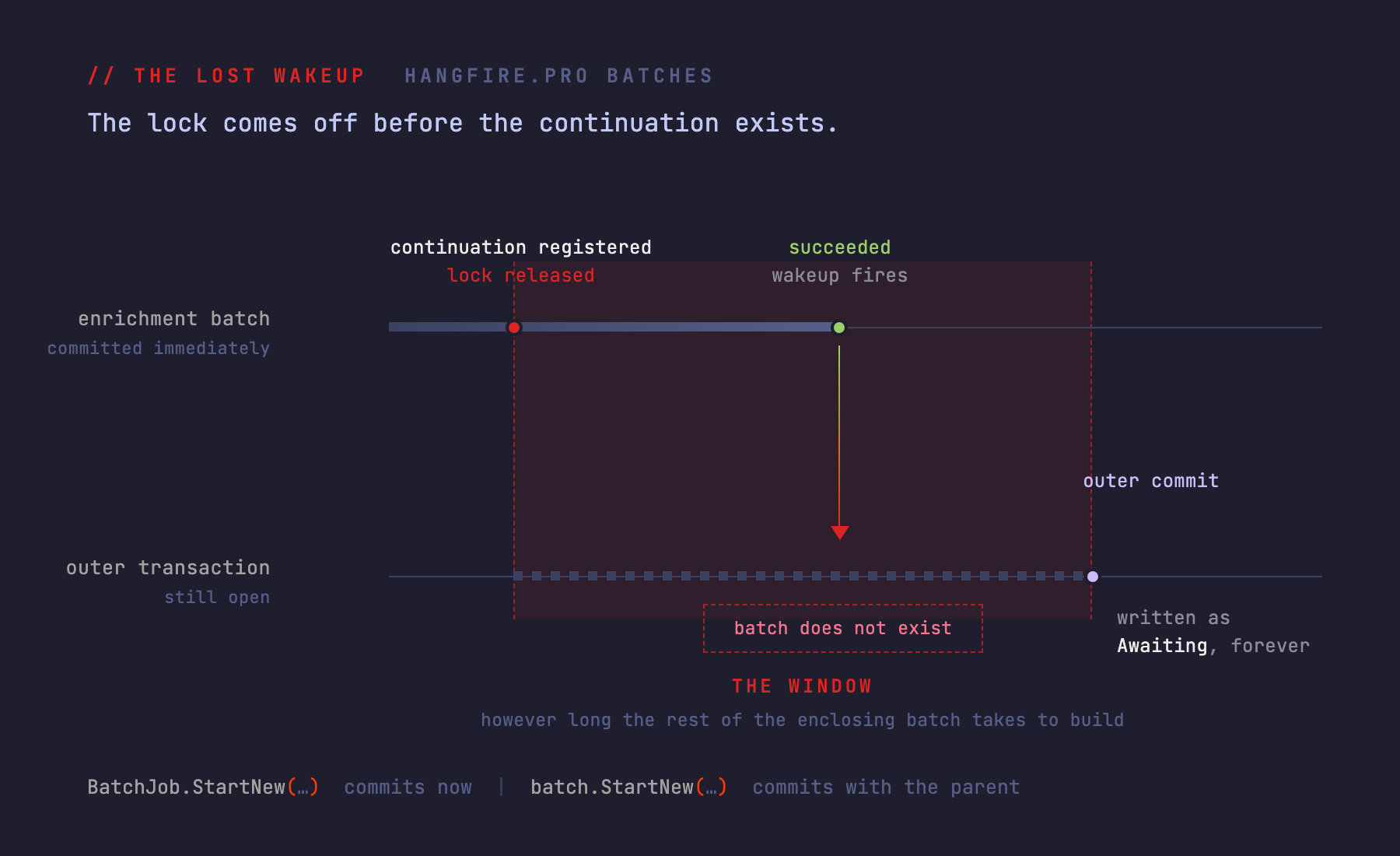
Cause: a continuation created nested inside an enclosing batch, whose antecedent was created with the static BatchJob.StartNew. The antecedent commits and starts running immediately. The continuation does not exist in storage until the enclosing batch commits, which can be hundreds of milliseconds later. If the antecedent finishes inside that window, the wakeup is lost, and nothing retries it.
Fix: one word.
-var enrichmentBatch = BatchJob.StartNew(enrich =>
+var enrichmentBatch = batch.StartNew(enrich =>
Go grep your logs for this. Warn level, from Hangfire.Batches.BatchContinuationsSupportAttribute:
Could not start a continuation batch '<batchId>' for batch '<batchId>': it does not exist or about to expireIf that string is in there, this is happening to you right now.
One caveat before any of the rest. Hangfire.Pro is a commercial, closed source product. Everything below about its internals came out of decompiling the shipped assembly, so it is implementation detail and it can change between releases. Version under test: Hangfire.Pro 3.0.5, Hangfire.Core 1.8.23, SQL Server storage.
What it looks like in the dashboard #
Batches, then Awaiting Batches. There is a batch that has been sitting there for two days.
Open it. The Created tab lists the ValidationJob that never went anywhere. Now go find the enrichment batch it was waiting on.
Succeeded. Hours ago.
Those two facts cannot both be right. A continuation still waiting, on something that already finished.
The clue I had the whole time #
There is exactly one log line for this, and it names the batch id:
Could not start a continuation batch '...' for batch '...': it does not exist or about to expireIt is at Warn, from Hangfire’s own namespace, and that is the whole problem. Hangfire is chatty at Info, so the standard move is to push Hangfire.* up to Error or drop it on the floor. We had done that. Sensible at the time.
So the library had been telling us exactly which batch was broken, by id, for months, into a filter.
I am not going to pretend that felt good.
If you read nothing else here, go run that grep. It takes a minute and it either finds nothing or it ruins your afternoon in a useful way.
Batches, quickly, for people who have only used plain Hangfire #
Plain Hangfire gives you BackgroundJob.Enqueue and BackgroundJob.ContinueJobWith. A job, and a job that runs after a job.
Hangfire.Pro adds batches. A batch is a group of jobs treated as one unit, so you can say “when all of these finish, do this” without tracking individual job ids. BatchJob.StartNew makes one. BatchJob.ContinueBatchWith makes a batch that waits on another batch. Batches nest, and a parent is not done until its children are.
Here is the part that matters later: Pro has no tables of its own. On SQL Server a batch is a pile of rows in the generic Hash, Set and List tables, keyed by convention.
| Key | Table | Holds |
|---|---|---|
batch:{id} | Hash | CreatedAt, Description, and ParentId if nested |
batch:{id}:state | Hash | single field Data, current state as JSON |
batch:{id}:states | List | state history |
batch:{id}:created / :pending / :processing / :succeeded / :finished | Set | job ids by state |
batch:{id}:created:batches and the same :batches suffixes | Set | nested batch ids by state |
batch:{id}:continuations | Hash | continuations with non default options |
batch:{id}:continuations:succeeded / :finished | Set | registered continuation batch ids |
batches:started / :awaiting / :awaiting-job / :completed / :succeeded / :deleted | Set | the per state indexes the dashboard reads, Score is the Unix seconds timestamp of entry |
States are Created, Started, Awaiting, Completed, Succeeded, Deleted. Learn that key layout. It is the only reason the SQL at the end of this post is possible.
The code #
Simplified, but this is the shape. One outer batch holds the enrichment and validation pipeline plus some unrelated shipping, tax and inventory work, and a single continuation notifies downstream once all of it is done.
public string EnqueueOrderPostProcessing(OrderPayload payload)
{
    var batchId = BatchJob.StartNew(batch =>
    {
        EnqueueEnrichmentAndValidation(batch, payload);

        // ... several more batches created here for shipping, tax and inventory work ...
        var shippingBatch = BatchJob.StartNew(b => b.Enqueue<ShippingJobs>(x => x.Recalculate(payload)));
        var taxBatch = BatchJob.ContinueBatchWith(shippingBatch, b => b.Enqueue<TaxJobs>(x => x.Recalculate(payload)));
        BatchJob.ContinueBatchWith(taxBatch, b => b.Enqueue<InventoryJobs>(x => x.Reserve(payload)));
    });

    BatchJob.ContinueBatchWith(batchId, batch =>
    {
        batch.Enqueue<INotifier>(n => n.NotifyDownstream(payload));
    });

    return batchId;
}

private void EnqueueEnrichmentAndValidation(IBatchAction batch, OrderPayload payload)
{
    foreach (var chunk in payload.OrderIds.Chunk(BatchSize))
    {
        var chunkList = chunk.ToList();

        // BUG IS HERE: static BatchJob.StartNew commits immediately, and these jobs start running now
        var enrichmentBatch = BatchJob.StartNew(enrich =>
        {
            enrich.Enqueue<PricingJob>(j => j.Run(chunkList));

            if (_featureFlags.IsEnabled(FeatureFlag.FraudCheck))   // a database round trip, per chunk
            {
                enrich.Enqueue<FraudCheckJob>(j => j.Run(chunkList));
            }
        });

        // ...but this continuation is a CHILD of the outer batch, so it is not written to
        // storage until the enclosing BatchJob.StartNew commits
        batch.ContinueBatchWith(enrichmentBatch, validate =>
        {
            validate.Enqueue<ValidationJob>(j => j.Run(chunkList));
        });
    }
}
Look at those two calls sitting next to each other. BatchJob.StartNew and batch.ContinueBatchWith.
They read like siblings.
What I thought it was first #
Chunking. Obviously chunking.
The failures clustered on bigger orders, bigger orders meant more chunks, and more chunks meant more of everything. I spent a while convinced the loop was racing itself, that two chunks were somehow stepping on each other’s batch ids. Added logging around the chunk boundaries. Found nothing, because there was nothing.
Then the feature flag, because IsEnabled does a database round trip and it is inside the loop. Wrong again, but closer than I knew at the time. The flag call was not the cause. It was making the window wider.
What finally moved it was reading the warning properly. Not “some continuation failed” but “it does not exist”. Present tense. Storage was asked for a batch and there was nothing there.
That is a strange thing to be true about a batch you are in the middle of creating. Unless it has not been created yet.
Two ways to make a batch #
This is the whole post, so it is worth being slow about.
BatchJob.StartNew(...), the static facade, goes to BatchJobClient.Create. It opens its own storage connection, takes a distributed lock on the new batch id, writes everything, commits. Immediately. The jobs inside are enqueued and a worker can pick one up the instant the call returns. By the time your next line of C# runs, that batch might already be executing.
batch.StartNew(...) and batch.ContinueBatchWith(...), called on the IBatchAction you are currently inside, create a nested batch. BatchAction.Create stamps ParentId into the hash and queues the child in memory. Then in BatchFactory.Create:
context.Transaction.SetRangeInHash("batch:" + context.BatchId, context.Batch);
if (!context.Batch.ContainsKey("ParentId"))
{
    _stateMachine.ApplyState(...);
}
Read the condition. A nested batch does not get its state applied there. All of it goes into the outer batch’s transaction, and none of it exists in storage until the enclosing BatchJob.StartNew returns.
Same verb. Same shape where you type it. Completely different commit semantics, and nothing in the type system is going to mention it.
One thing that is not obvious #
An aside, because it cost me an afternoon: IBatchAction only declares BatchId. The reason batch.StartNew(...) compiles at all is that it inherits IBackgroundJobClient, IBatchJobClient and IBackgroundJobClientV2. You will not work that out from the interface declaration.
Pro is not naive about this #
Worth saying, because the obvious version of this race is handled. When a batch is created in BatchAwaitingState, BatchContinuationsSupportAttribute.OnStateElection calls AddContinuation. Paraphrased from the decompiled source:
using (context.Connection.AcquireDistributedBatchLock(parentBatchId, TimeSpan.FromMinutes(1)))
{
    using var tx = context.Connection.CreateWriteTransaction();

    tx.AddToSet("batch:" + parentBatchId + ":continuations:succeeded", context.BatchId);

    var parentState = context.Connection.GetBatchState(parentBatchId);
    if (parentState == null)
        throw new InvalidOperationException("Can not find antecedent batch ... to create a continuation.");

    if (parentState.IsFinal)
    {
        context.CandidateState = ShouldStartContinuation(parentState, options)
            ? new BatchStartedState { Reason = "Antecedent batch was already finished" }
            : new BatchDeletedState { Reason = "Continuation condition was not satisfied" };
    }

    tx.Commit();   // registration is committed here, separately, and the lock is released
}
It takes a lock on the antecedent. It re-reads the antecedent’s state under that lock. If the antecedent already finished, it starts the continuation right there rather than waiting on a wakeup that is never coming.
Somebody thought about this.
The catch is what IsFinal actually sets. A candidate state. The continuation’s own BatchAwaitingState row gets written afterwards by BatchStateMachine.ApplyState, into the outer batch’s transaction.
Which is still open.
The lost wakeup #
The other half. When the antecedent goes final, OnStateApplied calls ExecuteContinuationsIfExist, which walks the continuation sets and calls into the state changer for each id:
if (_process.ChangeState(new BatchStateChangeContext(
        context.Storage, context.Connection, continuationBatchId,
        new BatchStartedState { Reason = "Antecedent batch has finished" },
        BatchAwaitingState.StateName)) == null)
{
    _logger.Warn("Could not start a continuation batch '" + continuationBatchId +
                 "' for batch '" + context.BatchId + "': it does not exist or about to expire");
}
And BatchStateChanger.ChangeState opens with this:
var hash = context.Connection.GetAllEntriesFromHash("batch:" + context.BatchId);
if (hash == null || hash.Count == 0)
{
    return null;
}
No hash, no batch. Return null, log a warning, move on.
The sequence #
Put the halves together:
- Under the lock on the enrichment batch, the validation continuation is registered into
batch:{enrichment}:continuations:succeededand committed. Enrichment is not final yet, so the candidate state staysAwaiting. The lock is released. - The outer transaction keeps building. More chunks. A feature flag lookup per chunk. Three more batch creations for shipping, tax and inventory. Tens to hundreds of milliseconds of database round trips.
- The enrichment jobs, running since step 1, finish. Enrichment goes Succeeded.
ExecuteContinuationsIfExistfinds the validation batch id in the set and callsChangeState. batch:{validation}is not in storage. It is inside the outer transaction, uncommitted.ChangeStatereturns null, the warning fires, and nothing ever retries it. Continuations fire once, off the antecedent’s state transition, and the antecedent is now final forever.- The outer transaction commits and writes the validation batch as
Awaiting. It stays that way permanently,ValidationJobsitting in itscreatedset having never had a state applied.
The registration and the wakeup are serialized against each other by a lock on the antecedent. But the lock comes off before the continuation’s own state row is committed.
That gap is the bug.
And it is not a microsecond gap. It is however long the rest of the enclosing batch build takes. Ours was a per chunk feature flag call plus three more batch creations, which is why this showed up sometimes instead of never. A tighter loop hides it for years. A slower database makes it constant.
So my chunking theory was not wrong, exactly. It was one layer off. More chunks did cause it, but not by racing each other. They just made the window longer.
Three outcomes that look the same and are not #
Two of these are not this bug, and I checked the wrong one first.
| What you see | What it means |
|---|---|
| Continuation stuck in Awaiting forever, antecedent already final | The lost wakeup above |
| Continuation in Deleted, reason “Continuation condition was not satisfied” | The antecedent finished, but not in a state matching the continuation options |
| Continuation in Started, reason “Antecedent batch was already finished” | The race Pro does handle, caught under the lock |
The middle row deserves its own paragraph, because it catches a lot of people and it is not a race at all. ContinueBatchWith defaults to BatchContinuationOptions.OnlyOnSucceededState. One permanently failed job anywhere in the antecedent means the antecedent never reaches Succeeded, and your continuation is not stuck. It is deleted. Quietly, with a reason string you only see if you open that batch in the dashboard.
If you are hunting a continuation that never ran and it is not in Awaiting, look in Deleted before you assume you have a race.
The fix #
-        var enrichmentBatch = BatchJob.StartNew(enrich =>
+        var enrichmentBatch = batch.StartNew(enrich =>
Now the antecedent and the continuation are both nested children of the same outer batch, created in one transaction. BatchStateMachine.SortContinuations handles exactly this:
else if (createdItem is BatchedBatch batchedBatch &&
         batchedBatch.InitialState is BatchAwaitingState awaiting)
{
    if (createdBatchIds.Contains(awaiting.ParentBatchId) && !seenBatchIds.Contains(awaiting.ParentBatchId))
    {
        AddBatchContinuation(awaiting.ParentBatchId, batchedBatch);   // deferred until after its antecedent
    }
}
A continuation whose antecedent is a sibling in the same batch gets deferred until after that antecedent’s state is applied. The enrichment jobs are enqueued in the same commit, so they cannot start before the continuation exists.
The window closes because there is nothing left in it.
The trade off is that the enrichment jobs start marginally later, after the outer commit rather than during it. Which is what you wanted anyway.
The rule worth remembering #
Do not mix batch scopes.
Either both the antecedent and the continuation are top level, each a static BatchJob.* call committing independently. That is safe, because AddContinuation re-checks the antecedent under a lock and the antecedent is already durable by then. Or both are nested in the same batch, which is the case SortContinuations was written for. The broken shape is specifically a nested continuation whose antecedent is an external, already committed, already running batch.
Hangfire.Pro 2.1.0’s release notes list “Continuations now work properly, when antecedent job/batch and continuation have the same batch” as a fixed item. The same batch pattern is something the vendor deliberately made work.
Digging out the wreckage #
Everything in this section is a last resort. It is for a system that already has orphans in it, not maintenance, and raw SQL bypasses the batch:{id}:lock distributed lock, so do it with the job servers stopped or in a genuinely quiet window. Default schema is HangFire.
Finding the orphans #
Awaiting batches, with the state of whatever each one is waiting on:
SELECT      a.Value                                              AS BatchId,
            DATEADD(SECOND, CAST(a.Score AS BIGINT), '19700101') AS AwaitingSinceUtc,
            pid.ParentBatchId,
            COALESCE(ps.Value, '*** PARENT GONE ***')            AS ParentState,
            (SELECT COUNT(*) FROM HangFire.[Set] s2
             WHERE s2.[Key] = 'batch:' + a.Value + ':created')   AS CreatedJobs
FROM        HangFire.[Set] a
LEFT JOIN   HangFire.Hash st ON st.[Key] = 'batch:' + a.Value + ':state' AND st.Field = 'Data'
CROSS APPLY (SELECT JSON_VALUE(st.Value, '$.ParentBatchId') AS ParentBatchId) pid
LEFT JOIN   HangFire.Hash ps ON ps.[Key] = 'batch:' + pid.ParentBatchId + ':state' AND ps.Field = 'Data'
WHERE       a.[Key] = 'batches:awaiting'
ORDER BY    a.Score;
Read those results carefully, because this is where you can do real damage. A batch whose parent is gone, or whose parent is already BatchSucceededState, BatchCompletedState or BatchDeletedState, is orphaned and will never start. A batch whose parent is BatchStartedState is legitimately waiting and is doing its job.
Deleting everything in Awaiting will destroy live work. Do not do that.
Getting the payload back #
The payload is still readable, so you can recover what those jobs were meant to do before cleaning anything up:
SELECT DISTINCT j.Id, j.Arguments
FROM   HangFire.[Set] s
JOIN   HangFire.Job j ON j.Id = TRY_CAST(s.Value AS INT)
WHERE  s.[Key] LIKE 'batch:%:created'
  AND  j.InvocationData LIKE '%ValidationJob%';
Cleaning up without deleting #
For the cleanup itself, do not hard delete. Backdate ExpireAt on the batch’s Hash, Set and List rows and on its row in batches:awaiting, then let Hangfire’s own ExpirationManager sweep them. It runs delete top (@count) T ... where ExpireAt < @now, and JobExpirationCheckInterval defaults to 30 minutes.
There is a nice property in doing it that way. It self corrects. If you get one wrong and mark a batch that is actually still alive, its next state change calls PersistBatch, which clears ExpireAt again and rescues it from your cleanup script.
Leave the orphaned Job rows alone. CoreBackgroundJobFactory creates every job with ExpireAt set to creation plus 30 days, and a job in a batch that never started never has a state applied, so that expiry never gets cleared. They age out on their own, and they are not sitting in a queue in the meantime.
Prior art, such as it is #
I went looking for other people hitting this before I opened the decompiler. There is less out there than you would expect.
The closest is a forum thread, Batch Continuation Stuck. The reporter got impressively close: they narrowed it to “Job 1 in Batch 1 starts at the exact same time that Job 2 in Batch 2 is created”, with database timestamps colliding at the millisecond. Nobody from the project ever answered. No resolution.
HangfireIO/Hangfire#2080, “Hangfire.Pro multiple continuations - batches can be stuck in the Started state”, is open, but it is about jobs stuck Enqueued and fetched job counts. Different animal. HangfireIO/Hangfire#1035, “Continuations stuck in Awaiting State”, is a 2018 report against Hangfire 1.6.17 with a screenshot and not much else.
Pro 3.0.1/2.3.3 and 3.0.2/2.3.4 did ship nested batch fixes: empty nested batches remaining Started, nested batch jobs not triggering batch updates, a lock ordering deadlock when attaching nested batch continuations. None of them is this. 3.0.5 is a CSS only patch.
There is a decent reason for the silence, and it is not that nobody hit this. Pro is closed source and paid, so Pro bugs go to a support email rather than a public tracker. Whatever conversations happened, happened in someone’s inbox. Searching that warning string finds nothing because the people who hit it had nowhere public to put it, which is its own small argument about paid closed source infrastructure, and I will leave it there.
What I actually take from this #
The library is not doing anything indefensible. It guards the obvious race on purpose, with a lock and a re-read, and it guards it correctly. The failure only surfaces at the seam between two APIs that read as equivalent at the call site and are not underneath.
BatchJob.StartNew and batch.StartNew differ by four characters. One means “write this now and let the workers have it”. The other means “add this to the transaction I am already building”. Nothing where you type it tells you which is which, and both compile, and both look completely reasonable in review. I reviewed it. It looked completely reasonable.
Anyway. Go grep for Could not start a continuation batch.